Tuesday, March 25, 2014

How do you explain Java technologies to non-technical audience?

Today I had the interesting challenge of trying to explain various Java buzzwords to people with very little technical knowledge.  Basically, we wanted our talent managers (recruiters) at Quick Solutions to gain a high level understanding of some of the Java technologies they recruit people for.

In prepping for this presentation I put on my "simplification hat" and tried to think of the essence of some of the more popular Java technologies.  I wanted to leave the talent managers with a simple visual picture in their minds, that represented the benefits of each technology.  Then I followed each of those visuals up with a basic architecture diagram that explained how the technology fits into a typical application.  I also gave them sample questions and answers for each technology, all focused on the high-level benefits of each technology (which problems the technology is meant to solve).

At the beginning I also went over some of the reasons I love being a consultant, and how to use those to attract talent.  I basically walked through the bullet-points in this blog post.

The general feedback I got was that they were able to follow along and they found the information very helpful.  I suspect though I may have lost a few of them near the end, when I got onto design patterns :)

Below are some of the more visual slides from my presentation.  The full slide deck is available on Slideshare.


What do you think?  Did I pick the right visuals?  Could I have made it even simpler?

Friday, January 10, 2014

CodeMash 2014

CodeMash 2014 is winding down and as usual the conference was a blast! Lots of greats talks, lots of fun activities, and last but not least good time to be had in the waterpark! Outside of the talks they had activities such as lock picking, jam sessions, early morning 5K run, astronomy, 3D printing, game rooms, open spaces, lightning talks, kids fun at KidsMash, a StarTrek simulator, various parties, bacon bar, and on and on. This was my 4th year attending the conference and it is without a doubt my favorite developer conference. Hats off to the organizers!

This year I was fortunate enough to not only deliver one, but two talks at the conference. On Thursday I gave a talk on Web Service testing and Friday I did one on Kanban. The first talk went sort of ok.  I was very nervous, felt I stuttered too much through the material and didn't feel very sharp in my thoughts, so I didn't feel super good afterwards. I had a talk with Leon Gersing in the evening and he gave me some great pointers on delivering presentations and dealing with nerves. I went ahead and rehearsed my second talk several times in the evening and then delivered it the following morning and felt way more relaxed, sharp in my thoughts and quite enjoyed giving the talk. So thanks, Leon, for the tips! Now I am waiting for my family to join me at Kalahari, so we can hit the waterpark tonight and tomorrow.

The slide decks from my talks are available on Slideshare:


and


The slides have also been uploaded to the conference GitHub.

Wednesday, September 25, 2013

Agile Open Space

I enjoyed facilitating an Open Space meeting for agileLUNCHBOX today.  This was the first such meeting for that organization.  We had around 20 participants and did 2 rounds of discussions, in 3 circles.  We had a variety of topics posted and some great discussions.  I took a few photos of the event, which you can see below; including one that shows the topics that we discussed.  Click on an image to see a larger version.

Before kicking off the discussions I gave a brief overview of Open Space Technology.  Here is the short slide deck I went through.

At the end we had a brief retrospective and it was the general consensus that we should do another Open Space meeting at agileLUNCHBOX in the near future.  We are also going to look into having an Open Space evening at COHAA, where we have more time to work with.


Friday, September 20, 2013

Web Service Testing Talk

Today I gave a talk on Testing Web Services at the monthly QSI Tech Lunch.  I basically went through various products and frameworks that I have used when testing Web Services, talked about what kind of testing each one is suited for, and provided some general tips on Web Service testing.  I have uploaded the slides from the presentation to Slideshare and the code and test-scripts are available on GitHub.  I will be repeating this talk (likely with slight modifications) at the 2013 Columbus Code Camp, next month.

Saturday, August 31, 2013

7 Reasons to Become a Software Development Consultant

Happy developer
I have been a software development consultant for a few years now.  I sometimes get asked by friends and colleagues why I prefer being a consultant rather than becoming a full-time employee (FTE) at one of the many companies I have done contract work for.  Here are some of the reasons why I think consulting is the way to go.

  1. It forces you to stay on top of your game and as a result you end up becoming a very well rounded developer  
    • You can't get away with just learning the technology stack of a single company and eventually becoming stagnant.  You need to stay marketable, follow trends and learn the latest and greatest.
    • When working for a consulting company you are encouraged to attend conferences, do public speaking, etc. to enhance your career.     
  2. You get exposed to many different technologies and have an opportunity to learn a lot
    • I have never been hired onto a client assignment knowing every single technology listed on the job posting.  There are always some things I don't know beforehand, and as a result of the assignment will get to learn those.
  3. You end up doing a lot more new development (green-field projects) than you would ever do as an FTE
    • Consultants are rarely brought in for maintenance work, carrying the on-call phone, or doing production support; things that most developers are not too found of.
  4. You get to shop around and see how multiple companies do their software development
    • Eventually you become really good at picking up good habits from your clients, stuff you see that works, and assisting other clients in doing the same.  That makes you really valuable and your work rewarding (what you do matters).
  5. You typically don't do a lot of overtime, but when you do, it is paid
    • Clients are much more likely to ask their FTEs to do overtime than a consultant that they have to pay extra for.  Contracts are typically written with a 40 hour workweek in mind.  Any change in that requires paperwork and additional expense to the client (throwing off their budget), so most clients tend to avoid that.
  6. You get to work with and learn from really great people  
    • Consulting companies thrive on having the best and brightest minds and they ensure their employees do a lot of knowledge sharing.  QSI, the company I consult for is excellent at doing this.
    • Most clients you end up working for have some really good people as well (architects, tech leads, etc.), that you get to learn from.
  7. You are not stuck in the same old job
    • After few years in the same place many developers get bored and start wondering if the grass is greener somewhere else.  Being a consultant means you will have a frequent change of scenery, so you rarely have time to get bored.  If you like your client and do a good job, you can likely get renewed with them as long as you care to (for years).  If you are ready for something else, then complete your assignment and work with your consulting company to get a placement somewhere else.  It may take some time to get it worked out (you want to make sure you end things on a good note with the client), but it is a lot easier than having to quit your job and find a new company to work for.

Lastly, it is just a lot of fun!


Wednesday, March 13, 2013

Visually Import SSL Certificates to Java Keystores

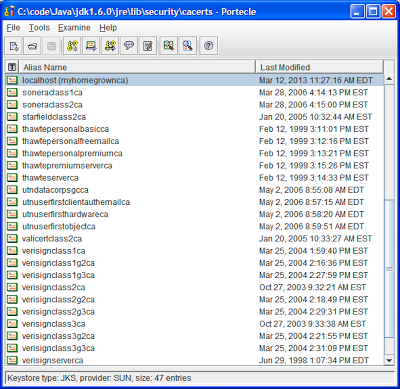
Working with SSL certs in Java, in particular those self-signed ones frequently found in dev & QA environments, usually means dealing with the command line keytool that comes with Java.  Either to add a certificate to a keystore (JKS file) or to add a new certificate authority to your truststore (cacerts file).  If you are tired of reading the keytool help or googling what the exact import command looks like (and have forgotten it in the year or so since you last had to deal with it), I recommend the GUI tool Portecle.  It makes it very easy to view the contents of a keystore/truststore file and to import new certificates, and it allows you to download public certificates right from within the tool.

To add a public key certificate to a keystore, open up the JKS file in Portecle, select Examine SSL/TLS Connection and type in the hostname and port number of the https site you would like add certificate from.  Then hit the PEM encoding button and save the certificate to a file.   Next click the Import Trusted Certificate button and select the file you exported and hit save.  That's it!

To add a trust for a new certificate authority in your truststore you open up your cacerts file (password most likely 'changeit') and add the CA certificate file via the Import Trusted Certificate button.  You will need to locate the CA certificate file on your app server and convert it to PEM format if it is not already in that format.  For example in WebLogic the CA file is located in the [WebLogic Home]/server/lib directory (CertGenCA.der by default).  In IIS you can export the CA file to PEM format through the IIS Management Console.  After importing the CA file to your cacerts file your JVM should trust certificates issued by that CA.


Thursday, September 27, 2012

Presentation - Kanban Case Study

Here are slides on a Kanban Case Study that I presented at agileLUNCHBOX today.  I basically recapped my experience using Kanban at Hugsmiðjan (maker of Eplica CMS), and showed how our Kanban board evolved over time.  I went over basic Kanban theory and covered a few advanced topics like associated metrics.  I also talked about how we integrated Kanban and Scrum.  The talk was well received and afterwards we had some good agile discussions.  

Friday, September 14, 2012

Web Service Development - Best Practices

As a software developer I have had to deal with a fair amount of Web Services, both as the consumer and provider of services.  Below is a list of best practice guidelines that I have gradually assembled and try to follow when developing Web Services.  I also usually send this list to people that are writing Web Services that I am to consume.  I have found that it saves me considerable headache when it comes time to integrate with the service.  Most of my guidelines are written with XML over SOAP in mind, but some are common sense tips that should apply to other types of Web Services, like JSON over REST.

The Guidelines

  1. A Web Service should be defined with a WSDL (or WADL in case of REST) and all responses returned by the Web Service should comply with the advertised WSDL.
    1. This can for example be tested with tools like SoapUI (see my blog entry Web Service Testing with soapUI) or XMLSpy, which validate SOAP responses against a WSDL.
  2. Use XML Schema to define the input and output of your Web Service operations.
    1. Make sure to define return types for all returned data, preferably as XSD ComplexTypes.
    2. Do not use the AnyType tag, as it makes it impossible (or non-beneficial) to use XML binding libraries to auto-generate code to construct request/response objects.
    3. For ComplexTypes, make sure the occurrence indicators (minOccurs and maxOccurs) are correctly defined, so that it is clear to the consumer which fields are required and which are optional and the frequency of each field.
    4. Make sure your namespaces are well defined (not some default like "org.tempuri")
  3. Do not use a proprietary authentication protocol for your Web Service.  Rather use common standards like HttpAuth or Kerberos.  Or define username/password as part of your XML payload and expose your Web Service via SSL.
  4. Keep it simple  
    1. Write a Web Service with many simple methods rather than one large method (with numerous arguments) that tries to be everything to everyone.
    2. Adhere to the OO principles of maximizing cohesion and minimizing coupling when designing your Web Services.
  5. Make sure your Web Service returns error messages that are useful for debugging/tracking problems.  For example, include an error code and a human readable error description.
  6. Make sure to offer a development environment for your service, which preferably runs the same Web Service version as production, but off of a test database rather than production data.
  7. Thoroughly test your Web Service, in a technology-agnostic manner, before having others integrate with it.

Consequences of Breaking These Guidelines


Why all these rules?  Because I have found it to significantly increase development time for the consumer when they are broken.  Here are some of the offenders I frequently come across, and the resulting consequences:
  • Web Services that don't define a WSDL and are poorly documented.
    • This usually leaves the consumer shooting in the dark as to how to communicate with the service and what to expect as a response.  This results in a lot of trial-and-error and having to manually write code to marshall & unmarshall the XML data.
  • Web Services that define a WSDL but don't conform to it.
    • This can be extremely frustrating for the Web Service consumer who usually ends up getting some sort of a cryptic error message from his generated XML bindings code.  That leads to a lot of head scratching and eventually writing the XML marshalling code from scratch.  I would say this is a worse offense than not defining a WSDL at all. 
  • Web Services that are hidden behind some proprietary authentication protocol.  
    • A good example that comes to mind is the NTLM v2 protocol that IIS supports and is a proprietary Microsoft protocol.  Integrating with this protocol from other technologies than .Net is usually not straight forward.  Last time I had to do it from Java we ended up having to purchase a proprietary library to be able to authenticate against the service, as no reliable open source implementation existed (which took us way to long to discover).
  • Web Services that define poor or no error messages.
    • These are the type of services that blow up with some XML parsing error, showing a stack trace that is specific to the Web Service implementation technology.  They basically provide no useful feedback to the consumer about what may have gone wrong and whether the issue is on the client or server side.  Furthermore, it leaves no way for the consumer to gracefully handle the error by choosing actions based on error type.
  • Web Services that don't work unless consumed in the authoring technology.
    • I have often I had to consume Web Services that were incorrectly autogenerated by some tool/framework (Siebel and .Net come to mind), and really don't conform to Web Service standards.  I therefore urge developers to test their own service with soapUI, JMeter or other standalone Web Service clients, before they publish it to others. That way you also get to chew your own dog food, so to speak, meaning you see what the XML for your service looks like.
That's my two cents on the issue.  If you have more guidelines to share, or don't agree with mine, I'd love to hear from you.