Tuesday, June 30, 2015

StirTrek Talk Available on YouTube

Last month I had the pleasure of presenting at StirTrek 2015, Ultron Edition.  This one day software development conference has grown into one of the premier technology events in town, so I felt honored to get a chance to present.  The conference was held at the Rave Theaters in Columbus, and as in previous years the 1500 attendee tickets were sold out in minutes.

I gave a talk on Testing Web Services, similar to ones previously presented at CodeMash and Columbus Code Camp.  According to the proctor manning my theater, 217 people attended the session.  The presentation went very well and I had a lot of people come up to me afterwards and thank me for the talk, which made me feel good.  The talk was recorded and can now be viewed on YouTube.  Only the audio and video feeds to the projector were captured, so you wont be able to see my face.  Well, maybe just as well.  If you want to learn more about SoapUI, JMeter and REST-assured, then give the video a shot.  It is about an hour long.  


The slides from the talk (with screenshots of most of what I walked through), along with all code/scripts are available in the StirTrek Github repo (downloadable zip file).

As always the conference ended with a private movie screening.  This time the movie was The Avengers: Age of Ultron.  My wife joined me and the rest of the Quick Solutions gang for the viewing, which was a great ending to a fun conference. 

Monday, March 16, 2015

JMS testing with HermesJMS

HermesJMS is a handy tool that can be used to visually interact with JMS destinations (JMS Queues or JMS Topics).  I find it convenient for ad hoc testing of JMS applications.  I use it to monitor the status of JMS Queues, browse their contents, and to drop messages onto queues for testing purposes.  

When viewing a message in a JMS Queue, HermesJMS shows you the JMS headers and the value of the message payload, even if the payload is a serialization of a custom Java object.   For example, in my current consulting engagement, we had a situation where we had a bad message stuck at the front of one of our JMS Queues (and due to invalid configuration our app kept processing that same message over and over, rather than proceeding onto the next message in the queue).  Through the WebLogic Console we were able to see that there was a message in the queue that wasn't getting processed, but we couldn't see the actual content of the message that was causing it to get stuck.  By connecting HermesJMS to the queue we could view the message payload and as a result identify and fix the issue.

Browse Queue Contents

The screenshot below shows an example of what browsing messages in a JMS Queue looks like:


The table lists the JMS messages currently in the queue and the JMS headers for each message.  Below the table is then a text rendering of the actual payload (typically a serialized Java object).  In this example the payload is a Java class called HermesDemo with two properties, foo and bar (which I creatively concocted for this blog post :)

Drag Messages Between Queues

Another handy feature of HermesJMS is that you can easily copy messages between queues.  For example, if I click on the top message in the demo/Queue on my local machine I can drag it over to a queue in my testing environment (UAT):


HermesJMS asks me to confirm the action and then copies the message over.  HermesJMS will automatically handle any necessary mapping if the JMS Destination names differ between the source and the target queues.  I find this drag and drop feature quite handy for ad hoc testing JMS applications in multiple environments.  I produce a message on one of my local queues and then drag it as needed onto a corresponding queue in the environment I want to test.  

Build Message Stores

HermesJMS also has a feature where you can build so called stores; that work off of a database rather than an actual JMS destination.  Using this feature you can build a database of various JMS messages and have them ready for dragging over to a remote destination anytime you need to test a specific condition in one of your JMS applications.

XML Export/Import

Alternatively HermesJMS allows you to export messages to XML files, for later import into queues/topics. To do this, you simply click on a message in the queue and select Save as XML... from the Messages menu, then give it a file name and hit save.  To import the message to a queue you click on the JMS Queue and select Send XML Encoded Messages from the Messages menu and then select the XML file to import from on your hard drive:


Note: if the JMS Destination name does not match between the source and target queues you will need to edit the XML and update the value to match that of the target queue.  

In our example the exported DemoClass.xml file looks like this:

where the value of the object tag is an object serialization + Base64 encoding of the following Java class:

When you export a message from a Queue to XML, HermesJMS handles the serialization magic for you and writes it out to the XML file.   If you want to create a new XML message from scratch (e.g. when adding the first message for a queue), you can build the serialization string using the SerializeHermesDemoClass in my Github repo (just modify the main method to use whatever class you want to serialize).

Setup Instructions

Below are basic instructions for getting HermesJMS set up.  In my case I am using WebLogic as the application server.  Setup for other app servers is similar; you just need to use the ContextFactory and jar files specific to that app server.  If you go to hermesjms.com you will find setup instructions for many app servers under the Providers menu.

  1. Download and install HermesJMS, either directly from Sourceforge or as part of SoapUI install.
  2. Start HermesJMS by running hermes.bat/hermes.sh.
  3. Create a ClasspathGroup for your app server jar files 
    1. Select Option and Preferences
    2. Click on the Providers tab
    3. Right-click on Classpath Groups and select Add Group and give it a name (e.g. JarDependencies)
    4. Click the + sign and right-click on Library and select Add Jars and find the jar files you want to import.  In our case that is weblogic.jar, wlclient.jar, and HermesDemo.jar, which has the custom Java class used in our demo.  If you want HermesJMS to show the contents of a custom Java object in your JMS Queue, it needs to have the corresponding class file on its classpath.  You can either add the jar here, or alternatively edit hermes.bat/hermes.sh and add it where the CLASSPATH variable gets set.
  4. Next we need to create a Session for JNDI browsing the JMS server 
    1. On the Preferences screen, click the Sessions tab.
    2. Give the session a name, corresponding to the JMS server you are pointing it to.
    3. Select the Plug In matching your app server.  In our case it is BEA WebLogic.
    4. Under Loader, select your JarDependencies and under Class select hermes.JNDIConnectionFactory.
    5. Populate the binding, initialContextFactory, providerUrl, and security properties as appropriate for your app server.  For WebLogic the properties are:
    6. If the destination names don't get auto-populated, right-click under Destinations and add the names of JMS Queues/Topics you want to connect to on the JMS Server.

Note: If you are using WebLogic you can alternatively download this
pre-populated hermes-config.xml file and put it in your .hermes directory (replacing the default one that HermesJMS puts there during install).  Before you run HermesJMS make sure you edit the file and change the following:
  • Update the providerUrl value to match the server and port of your JMS Server.
  • Set the securityCredentials and securityPrincipal values to mach your username and password.
  • Edit the library paths for JarDepdencies and make sure they point to wherever you have these jar files on your machine.

In Conclusion

I hope this overview and these setup instructions help you get going with HermesJMS.  Once you have it working, interacting with your JMS destinations is a breeze, and testing a given JMS app can be as simple as a drag and drop.

If you need to run a suite of JMS tests, e.g. for sanity testing or load testing, you can use SoapUI, which knows how to interact with HermesJMS.  I may write a future blog post demonstrating this integration.  For SoapUI basics, see this blog post.

All the examples used for this blog post can be seen in this Github repo.

Happy JMSing!

Tuesday, March 25, 2014

How do you explain Java technologies to non-technical audience?

Today I had the interesting challenge of trying to explain various Java buzzwords to people with very little technical knowledge.  Basically, we wanted our talent managers (recruiters) at Quick Solutions to gain a high level understanding of some of the Java technologies they recruit people for.

In prepping for this presentation I put on my "simplification hat" and tried to think of the essence of some of the more popular Java technologies.  I wanted to leave the talent managers with a simple visual picture in their minds, that represented the benefits of each technology.  Then I followed each of those visuals up with a basic architecture diagram that explained how the technology fits into a typical application.  I also gave them sample questions and answers for each technology, all focused on the high-level benefits of each technology (which problems the technology is meant to solve).

At the beginning I also went over some of the reasons I love being a consultant, and how to use those to attract talent.  I basically walked through the bullet-points in this blog post.

The general feedback I got was that they were able to follow along and they found the information very helpful.  I suspect though I may have lost a few of them near the end, when I got onto design patterns :)

Below are some of the more visual slides from my presentation.  The full slide deck is available on Slideshare.


What do you think?  Did I pick the right visuals?  Could I have made it even simpler?

Friday, January 10, 2014

CodeMash 2014

CodeMash 2014 is winding down and as usual the conference was a blast! Lots of greats talks, lots of fun activities, and last but not least good time to be had in the waterpark! Outside of the talks they had activities such as lock picking, jam sessions, early morning 5K run, astronomy, 3D printing, game rooms, open spaces, lightning talks, kids fun at KidsMash, a StarTrek simulator, various parties, bacon bar, and on and on. This was my 4th year attending the conference and it is without a doubt my favorite developer conference. Hats off to the organizers!

This year I was fortunate enough to not only deliver one, but two talks at the conference. On Thursday I gave a talk on Web Service testing and Friday I did one on Kanban. The first talk went sort of ok.  I was very nervous, felt I stuttered too much through the material and didn't feel very sharp in my thoughts, so I didn't feel super good afterwards. I had a talk with Leon Gersing in the evening and he gave me some great pointers on delivering presentations and dealing with nerves. I went ahead and rehearsed my second talk several times in the evening and then delivered it the following morning and felt way more relaxed, sharp in my thoughts and quite enjoyed giving the talk. So thanks, Leon, for the tips! Now I am waiting for my family to join me at Kalahari, so we can hit the waterpark tonight and tomorrow.

The slide decks from my talks are available on Slideshare:


and


The slides have also been uploaded to the conference GitHub.

Wednesday, September 25, 2013

Agile Open Space

I enjoyed facilitating an Open Space meeting for agileLUNCHBOX today.  This was the first such meeting for that organization.  We had around 20 participants and did 2 rounds of discussions, in 3 circles.  We had a variety of topics posted and some great discussions.  I took a few photos of the event, which you can see below; including one that shows the topics that we discussed.  Click on an image to see a larger version.

Before kicking off the discussions I gave a brief overview of Open Space Technology.  Here is the short slide deck I went through.

At the end we had a brief retrospective and it was the general consensus that we should do another Open Space meeting at agileLUNCHBOX in the near future.  We are also going to look into having an Open Space evening at COHAA, where we have more time to work with.


Friday, September 20, 2013

Web Service Testing Talk

Today I gave a talk on Testing Web Services at the monthly QSI Tech Lunch.  I basically went through various products and frameworks that I have used when testing Web Services, talked about what kind of testing each one is suited for, and provided some general tips on Web Service testing.  I have uploaded the slides from the presentation to Slideshare and the code and test-scripts are available on GitHub.  I will be repeating this talk (likely with slight modifications) at the 2013 Columbus Code Camp, next month.

Saturday, August 31, 2013

7 Reasons to Become a Software Development Consultant

Happy developer
I have been a software development consultant for a few years now.  I sometimes get asked by friends and colleagues why I prefer being a consultant rather than becoming a full-time employee (FTE) at one of the many companies I have done contract work for.  Here are some of the reasons why I think consulting is the way to go.

  1. It forces you to stay on top of your game and as a result you end up becoming a very well rounded developer  
    • You can't get away with just learning the technology stack of a single company and eventually becoming stagnant.  You need to stay marketable, follow trends and learn the latest and greatest.
    • When working for a consulting company you are encouraged to attend conferences, do public speaking, etc. to enhance your career.     
  2. You get exposed to many different technologies and have an opportunity to learn a lot
    • I have never been hired onto a client assignment knowing every single technology listed on the job posting.  There are always some things I don't know beforehand, and as a result of the assignment will get to learn those.
  3. You end up doing a lot more new development (green-field projects) than you would ever do as an FTE
    • Consultants are rarely brought in for maintenance work, carrying the on-call phone, or doing production support; things that most developers are not too found of.
  4. You get to shop around and see how multiple companies do their software development
    • Eventually you become really good at picking up good habits from your clients, stuff you see that works, and assisting other clients in doing the same.  That makes you really valuable and your work rewarding (what you do matters).
  5. You typically don't do a lot of overtime, but when you do, it is paid
    • Clients are much more likely to ask their FTEs to do overtime than a consultant that they have to pay extra for.  Contracts are typically written with a 40 hour workweek in mind.  Any change in that requires paperwork and additional expense to the client (throwing off their budget), so most clients tend to avoid that.
  6. You get to work with and learn from really great people  
    • Consulting companies thrive on having the best and brightest minds and they ensure their employees do a lot of knowledge sharing.  QSI, the company I consult for is excellent at doing this.
    • Most clients you end up working for have some really good people as well (architects, tech leads, etc.), that you get to learn from.
  7. You are not stuck in the same old job
    • After few years in the same place many developers get bored and start wondering if the grass is greener somewhere else.  Being a consultant means you will have a frequent change of scenery, so you rarely have time to get bored.  If you like your client and do a good job, you can likely get renewed with them as long as you care to (for years).  If you are ready for something else, then complete your assignment and work with your consulting company to get a placement somewhere else.  It may take some time to get it worked out (you want to make sure you end things on a good note with the client), but it is a lot easier than having to quit your job and find a new company to work for.

Lastly, it is just a lot of fun!


Wednesday, March 13, 2013

Visually Import SSL Certificates to Java Keystores

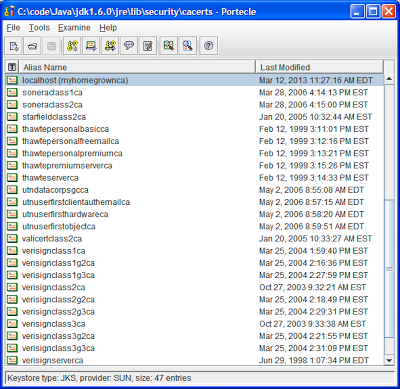
Working with SSL certs in Java, in particular those self-signed ones frequently found in dev & QA environments, usually means dealing with the command line keytool that comes with Java.  Either to add a certificate to a keystore (JKS file) or to add a new certificate authority to your truststore (cacerts file).  If you are tired of reading the keytool help or googling what the exact import command looks like (and have forgotten it in the year or so since you last had to deal with it), I recommend the GUI tool Portecle.  It makes it very easy to view the contents of a keystore/truststore file and to import new certificates, and it allows you to download public certificates right from within the tool.

To add a public key certificate to a keystore, open up the JKS file in Portecle, select Examine SSL/TLS Connection and type in the hostname and port number of the https site you would like add certificate from.  Then hit the PEM encoding button and save the certificate to a file.   Next click the Import Trusted Certificate button and select the file you exported and hit save.  That's it!

To add a trust for a new certificate authority in your truststore you open up your cacerts file (password most likely 'changeit') and add the CA certificate file via the Import Trusted Certificate button.  You will need to locate the CA certificate file on your app server and convert it to PEM format if it is not already in that format.  For example in WebLogic the CA file is located in the [WebLogic Home]/server/lib directory (CertGenCA.der by default).  In IIS you can export the CA file to PEM format through the IIS Management Console.  After importing the CA file to your cacerts file your JVM should trust certificates issued by that CA.